
 Find a branch
 Contact
 Help
Help
Latest scams & alerts.
To help better protect you, this page provides information on some of the scams that are circulating at the moment.
October 2026.
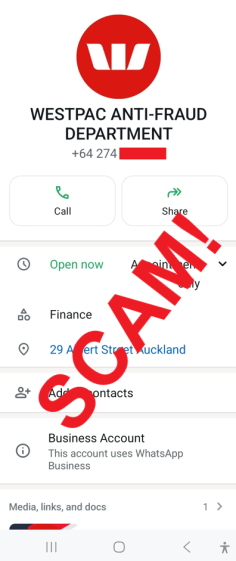
Bank impersonation scams: tactics to watch out for
What's happening?
What should I do?
-
Never share your online banking password or card PIN with anyone.
-
Be cautious if someone who has contacted you unexpectedly asks for an authentication code or one-time passcode.
-
Never click links in unexpected messages.
-
Never approve a payment, add a payee, transfer money or authorise a security change at the direction of someone who has contacted you unexpectedly.
-
Never download software or grant remote access to your device at the request of an unexpected caller.
-
If someone claims to be from your bank and you're unsure, hang up and call back using the official number on the bank's website or the back of your card.
Remember
September 2026.
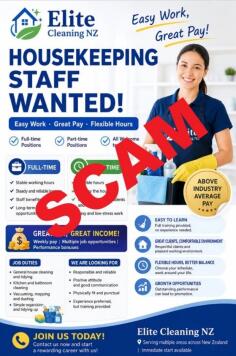
Fake job advertisements on social media
What's happening?
Scammers are using social media platforms to advertise fake jobs and recruitment opportunities. Many of these scams target people looking for cleaning, administration, truck driving, customer service, or work-from-home roles.
After expressing interest in a job advertisement, victims are contacted by someone claiming to be a recruiter and are instructed to download an app or software as part of the hiring process. These applications may contain malware designed to compromise devices, steal passwords, harvest personal information, or allow scammers to access your online accounts. Westpac NZ has recently received reports involving multiple social-media pages using this approach.
What to look out for
Requests to download an app as part of the hiring process: Be cautious if a ‘recruiter’ asks you to install software before providing information about the role or conducting an interview. Exercise particular caution if:
- The app is provided through a social media message, text message, email, or website link rather than an official app store
- The app has very few reviews or downloads
- You are told the app is required for registration, onboarding, verification, or accessing available jobs.
Hiring processes that move quickly: Be suspicious if you receive a job offer with little or no interview process, limited background checks, or minimal discussion about your experience and qualifications. A genuine employer will usually want to discuss your background and suitability for the role before offering you a position.
Communication through social media or messaging apps: Exercise caution if recruiters insist on communicating only through Facebook Messenger, WhatsApp, Telegram, or similar messaging platforms rather than using official company channels.
Unrealistic pay or conditions: Be wary of opportunities promising high wages, flexible hours, work-from-home arrangements, or easy money for minimal effort. If it seems too good to be true, it probably is!
Requests for personal information: Be cautious if you're asked to provide copies of identification documents, banking details, passports, or driver licences before you have independently verified the employer and the role.
Suspicious social media pages: Be cautious of recruitment pages that:
- Were recently created
- Contain largely AI-generated images
- Provide very little information about the employer, job location, or recruitment process
- Advertise multiple different roles with vague descriptions.
Pressure to act immediately: Scammers often create urgency by claiming positions are filling quickly or that immediate action is required to secure the role. Take your time and independently verify the opportunity before proceeding.
What should I do?
Before applying for a job:
- Research the employer independently
- Do not download applications or software simply because a recruiter requests it
- Never pay recruitment fees, purchase training materials, or transfer money as part of a job application process
- Be very cautious about sharing identity documents, banking information, or other personal details until you have confirmed the opportunity is genuine.
If you believe you may have been affected:
- Stop all contact with the ‘recruiter’ immediately
- Have your device checked and cleaned by an IT professional
- Change passwords for important accounts, particularly banking and email accounts
- Contact your bank immediately if you believe your financial information may have been compromised
- Report the content to the social media platform and block the scammers across all devices
- You can also contact IDCARE for specialist aftercare support.
June 2026.
Phishing scams involving digital wallets
What’s happening?
Scammers are adding victims’ cards to digital wallets (such as Google Pay or Apple Pay) on the scammers’ own devices, effectively creating a virtual copy of the card.
To do this, scammers first obtain the victim’s:
- Card details
- One-time authentication codes.
These are typically collected through phishing emails or texts, fake websites, social media messages, or impersonation phone calls. Sometimes scammers send messages, such as texts or emails, that appear to come from a trusted organisation such as Air New Zealand.
These messages are designed to create urgency, for example by suggesting that rewards points are about to expire, and they often include a link to a website that looks genuine but is actually fake and designed to steal the customer’s information.
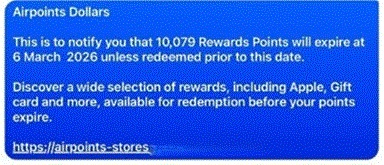
Above: phishing text claiming that rewards points are expiring.
Once the scammer has this information, they can register the card on their own mobile wallet, which allows the scammer to make in-person tap-and-pay purchases without the customer’s physical card being present. They can also make online purchases.
What should I do?
- Be cautious of unexpected or suspicious emails, texts, social media messages, or phone calls.
- Do not click links or download attachments from unknown or unsolicited messages.
- Only enter your details on trusted, official websites or apps.
- Never share:
- One-time authentication codes
- Internet banking or app login details
- Full card details.
- If you receive a notification that Google Pay or Apple Pay has been added to your card and you did not authorise it, contact your bank immediately.
- Read messages from your bank carefully. If a one-time authentication code seems suspicious or is for something you didn’t request, stay alert and contact your bank immediately.
- You can also contact ID Care for specialist aftercare support.
May 2026.
Scam Facebook pages advertising free classes or activities
What’s happening?
Fraudulent Facebook groups advertising ‘free’ local activities—such as Tai Chi, walking clubs, or dance classes—have emerged as a growing and increasingly sophisticated type of scam. These scam groups are used to trick people into downloading malware, steal money or financial information, or harvest personal data. The images below show an example.


What to look out for
Mandatory app downloads: Be wary of any activities that require installing an app. Exercise caution especially if:
- You are directed to download the app via a link in Messenger or a website instead of the official Apple App Store or Google Play Store
- The app appears unverified or has very few downloads or reviews.
Unsolicited messages from ‘admins’: You receive private messages from alleged group members or administrators urging you to call them or click a link. Scammers strike fast and pressure you to act quickly. Take some time, slow down, think about what’s happening, and do not feel pressured to act.
Avoidance of in-person details: Organisers are vague about locations or schedules or claim you must register through an app before they will share basic details like times and venues.
‘Too good to be true’ freebies or unrealistic promises: Classes may be advertised as completely free with no affiliation to a recognised community centre, council, or legitimate health organisation, and are often paired with exaggerated or unrealistic promises of rapid fitness or health improvements.
Suspicious profiles or pages: The Facebook page is newly created, has minimal followers, or all images and posts were uploaded on the same day.
AI-generated or unusual content: Be aware of these possible scam indicators:
- Videos or images that seem to be AI-generated
- Dramatic ‘before and after’ body transformations that are claimed to happen very quickly
- Mismatches between branding and content, with New Zealand–based groups displaying overseas imagery.
What should I do?
Do not download unverified apps. If you believe you’ve been affected by a scam:
- Have your phone or device checked and cleaned by an IT professional.
- Contact your bank immediately
- Report the content to the social media platform and block the scammers across all devices
- You can also contact ID Care for specialist aftercare support.
April 2026.
Fake news items impersonating high-profile people to promote scams
What’s happening?
We’ve seen a recent increase in fake news articles and social media posts impersonating high-profile people, including business leaders and politicians. Westpac New Zealand CEO Catherine McGrath was included in a series of recent fake news items.
These fake news items are being used to promote fraudulent online investment schemes, and they may include deepfakes, which are realistic but fake images or video generated by AI (artificial intelligence). These fake news stories may appear to be published by legitimate media outlets, but this is a deception – they’re made by scammers.
Recent examples of these fake stories have included articles about disputes between public figures, and claims that these figures endorse online investment schemes.

Deepfake videos and images are not new, but advancements in technology have made them much easier to create and they’re increasingly being used by scammers.
What to look out for
- Scammers are placing ads on social media platforms. These ads usually include provocative fake images or videos of high-profile New Zealanders. These ads may appear to be published by legitimate news outlets.
- The scam ads link to fake news articles hosted on different websites. These articles include fake quotes from public figures about endorsing online investment platforms. They also include links to those platforms.
- When people click through to the investment platforms, they are asked to enter their contact details on a registration form. If they do this, they will be contacted by a scammer who will claim to be an investment broker. The scammer will give the potential victim instructions for using the platform to make investments.
- At first, the scammers will suggest that victims make small ‘investments’. As the scam progresses, the scammers will ask that the payments are increased. The scam may include a login for a website where victims can track their account balances. Such websites show fraudulent information and are manipulated by the scammers.
- If victims try to withdraw their money from the scheme, they will be asked to pay extra fees. If they pay, the money will be lost and their money will not be released. They will not get their money back from the investment scheme.
What should I do?
Be very cautious about any online ads or articles that use images or videos of well-known New Zealanders to promote investment schemes. We recommend you do not click on these ads. Do not enter any personal information into a website that is linked to one of these ads.
If you have already entered your details, do not send any money to the scammers. If they attempt to contact you, including by phone call, text message or email, do not engage with them.
If you believe you have been the victim of a scam:
- Contact your bank immediately.
- Stop all contact with the scammers and don’t send any more money.
- Report the content to the social media platform and block the scammers on all devices
- Be aware that you may also get contacted by people claiming they can help you recover these funds (these are known as recovery room scams)
- You can also contact ID Care for specialist aftercare support.
More information
Read the following warnings by the Financial Markets Authority (FMA):
Fake celebrity investment scam – Multiple trading platforms
Independently verify providers by checking the Financial Service Providers Register:
November 2025.
Bank impersonations targeting business customers
We're seeing increased scam activity in which Westpac business customers are receiving calls from scammers impersonating bank staff. The scammers are directing people to fake websites with a link to log-in directly to online banking in an attempt to steal confidential information.
What to look out for:
Please be cautious of any unexpected contact and only use verified Westpac digital banking channels such as Westpac One or Business Online accessed via our main website, or via the official Westpac One app.
How to avoid bank impersonations
- If you're ever unsure about a call from us or any other bank, hang up and call using a number listed on the public website.
- If you believe you have been contacted by a scammer and shared any information, please call us immediately, contact your Relationship Manager or visit your local branch.
Important security reminder:
Westpac will never ask for your login details – including your username and password – by email or phone.
We will never send direct links to log in to our online banking platforms via email or SMS.
July 2025.
Online marketplace scams
What’s happening?
Online marketplaces like Facebook Marketplace can be a great way to buy and sell things, but it's also a hotspot for scammers. Scammers pose as buyers and sellers to try and scam you out of money or the items you’re selling, or to get your personal or banking information.
If you’re buying
Buyers may be tricked into paying for a product that doesn't exist or is never delivered.
If you’re selling
Sellers may be tricked into believing the buyer has paid in full (they may send you a fake ‘proof of payment’), however you later find the money was not paid into your account.
Watch out for phishing links too. It’s common for scammers to pretend to arrange shipping and send a phishing link to steal banking information from you – never click on these links.
What to look out for:
- Recently set up buyer/seller profiles, poor feedback or limited friends or connections depending on the platform.
If you’re buying:
- Price is too good to be true: Be cautious if the item is being sold at an unusually low price.
- Suspicious product listings: Check if the product details or pictures have been copied from another site, which can indicate a scam.
- Pressure to complete sale: If a seller pressures you to complete the sale quickly, it’s a red flag.
- Signs that the seller is based overseas: For example, listing products in New Zealand but profile photos, details and friends list indicates the individual is based overseas.
If you’re selling:
- Buyer offering immediate payment: Be cautious if a buyer immediately offers to pay for a high-value item without viewing it first.
- Pressure to complete sale: Be wary if someone is asking you to release the goods before you’ve received payment. Screenshots showing proof of payment can be forged or altered. Look out for future dated payments that may be cancelled after the goods have been obtained.
How to avoid online marketplace scams:
- Avoid trading if the other person’s profile has been recently set up, if they have bad feedback, or limited friends or connections depending on the platform.
- Be wary of any requests to complete trades or communicate off the platform or by means that aren't normal for that platform. For example, wanting to message on WhatsApp.
- Don’t click on links provided by buyers or sellers. Never share your online banking credentials/ password, card details or SMS one-time codes.
If you’re buying:
- Inspect goods in person: If possible, view the goods in person before completing the purchase to avoid any surprises.
- Unusual payment methods: Avoid payment methods like cryptocurrency, gift cards, postage payments, or overseas transactions.
- Mismatch of account names: Ensure that the account name matches the bank account details when making a payment.
- Deposit requests: Be wary if you're asked to pay a deposit to secure the item, especially if the seller claims there is high interest in the product.
If you’re selling:
- Payment proof: Always confirm that the funds are in your account before releasing the goods. Don’t rely on emails, texts, or screenshots as proof of payment.
- Phishing links: Don’t click on links provided by buyers to confirm postage, as these may be phishing attempts. Be wary of links claiming to be related to courier companies, banks or asking for credit card or online banking details.
April 2025.
Emails impersonating Westpac
We're receiving multiple reports of phishing emails impersonating Westpac. The campaign appears to be targeting Xtra email accounts and says that unusual activity has been detected on an account or that details need to be updated. It invites the user to click a link to secure or verify their account. These emails are phishing. The link should not be clicked and no details should be shared.
What should I do?
If you receive an email similar to this:
- Do not click on any links or download/open any attachments.
- Forward the email to phishing@westpac.co.nz
- Once reported, delete the email and block the sender.
- Please be extremely vigilant for any unexpected or suspicious emails, phone calls or text messages, particularly those that ask you to take urgent action.
- If you believe you've been targeted by a scam or have shared any details with a scam site, contact your bank immediately.
- If you think your personal details have been compromised, you can also contact ID Care on 0800 121 068 or 09 884 4440, 10am to 7pm, Monday to Friday.


Cryptocurrency scams
Scammers are using the increased public interest in cryptocurrency to create a sense of urgency and convince people to “invest” quickly without considering the risks.
They may also ask victims to purchase cryptocurrency when they’re carrying out a variety of scams including investment, relationship and employment scams - many of these start with an online advert or a social media post, DM or text message. Be careful as scammers may pose as account managers, brokers, financial advisors, mentors or recruiters.
Be cautious when dealing with crypto and make sure you do your research as it’s unlikely you’ll get your money back if it’s a scam. If you’ve been scammed, call us on 0800 400 600.
What to look out for
- Investment opportunities involving cryptocurrency.
- Investment opportunities that promise high or guaranteed returns.
- Being asked to purchase cryptocurrency online or use a cryptocurrency ATM.
- Being instructed to deposit into a cryptocurrency wallet you don’t control or haven’t set up yourself.
- Out of the blue contact about a job opportunity.
- Work-from-home opportunities advertised on social media.
- High paying jobs that have low hours and need no specialised skills or experience.
- Jobs that require you to invest your own money to earn income or use your personal bank accounts to process transactions.
- Being told to lie to your bank about the purpose of transactions.
- Celebrity endorsements (including political figures) for investments or cryptocurrencies.
- Offers to recover cryptocurrency lost in previous scams.
How to avoid cryptocurrency scams
- Always complete thorough, independent research on any cryptocurrency or investment opportunities.
- Visit the Financial Markets Authority website for information on the latest investment scams. The International Organization of Securities Commissions provides a consolidated list of many of the warnings issued by regulators globally.
- Avoid purchasing cryptocurrency if you don’t understand how it works and how to do so safely.
- If you are purchasing cryptocurrency, use well-known exchanges.
- Ensure that you have control over your cryptocurrency wallet (don’t allow others to set it up for you). Do not share your private key or seed phrase.
- Always be honest with your bank about the purpose of a transaction if it’s queried. We’re here to help you spot and avoid scams.
Find out more Keep cryptocurrency secure - Own Your Online.
2024 phishing alerts.
2023 phishing alerts.
2022 phishing alerts.
Report a scam.
Talk to us
If you believe you've been targeted by a scam, or any kind of fraud, contact us immediately. From overseas call +64 9 912 8000.

Email us
If you’ve received a suspicious email forward it to our dedicated phishing inbox.
Report to other agencies
Once you have spoken to us, you should report scams to other agencies so that they can take steps to prevent other people being targeted by them and losing money.
- Report fraud and scams to New Zealand Police
- Report online fraud and scams to Netsafe
- Report cybersecurity issues to National Cyber Security Centre
- Report investment scams to The Financial Markets Authority
- If you've been impacted by a scam or fraud, IDCARE provide specialist aftercare support.